Thursday, October 18, 2012

What is a Subnet?     


A portion of a network that shares a common address component. On TCP/IPnetworks, subnets are defined as all devices whose IP addresses have the same prefix. For example, all devices with IP addresses that start with 100.100.100. would be part of the same subnet. Dividing a network into subnets is useful for both security and performance reasons. IP networks are divided using a subnet mask.

IP Subnet Calculator

The IP Subnet Mask Calculator enables subnet network calculations using network class, IP address,subnet mask, subnet bits, mask bits, maximum required IP subnets and maximum required hosts per subnet.
Results of the subnet calculation provide the hexadecimal IP address, the wildcard mask, for use with ACL (Access Control Lists), subnet ID, broadcast address, the subnet address range for the resulting subnet network and a subnet bitmap.
For classless supernetting, please use the CIDR Calculator. For classful supernetting, please use the IP Supernet Calculator. For simple ACL (Access Control List) wildcard mask calculations, please use the ACL Wildcard Mask Calculator.


Notes about the Subnet Calculator 

 1.The subnet calculator implements a classful / classed IP addressing scheme where the following rules are adhered to:

Class A addresses have their first octet in the range 1 to 126 (binary address begins with 0).

Class B addresses have their first octet in the range 128 to 191 (binary address begins with 10).

Class C addresses have their first octet in the range 192 to 223 (binary address begins with 110).

2.The subnet calculator allows the use of a single subnet bit - for example, a class C address with a subnet mask of 255.255.255.128 is permitted.

3.The subnet calculator allows a subnet ID to have its final octet equal to the final octet of its subnet mask - for example, a class C network address of 192.168.0.192 with a subnet mask of 255.255.255.192 is permitted.

Different Types of Network Topologies


What is Network Topology?

Computer network topology is the way various components of a network (like nodes, links, peripherals, etc) are arranged. Network topologies define the layout, virtual shape or structure of network, not only physically but also logically. The way in which different systems and nodes are connected and communicate with each other is determined by topology of the network.Topology can be physical or logical. Physical Topology is the physical layout of nodes, workstations and cables in the network; while logical topology is the way information flows between different components. 

In general, physical topology relates to a core network whereas logical topology relates to basic network. 

Types of Physical Network Topologies


1)  Bus Topology
2)  Star Topology
3)  Ring Topology
4)  Mesh Topology
5)  Tree Topology
6)  Hybrid Topology

Factors to be taken into consideration while choosing a Network topology

1)  Scale of your project (in terms of number of components to be connected).
2)  Amount of traffic expected on the network.
3)  Budget allotted for the network i.e. amount of money you are willing to invest.
4)  Required response time


Bus topology


Bus Topology is the simplest of network topologies. In this type of topology, all the nodes (computers as well as servers) are connected to the single cable (called bus), by the help of interface connectors. This central cable is the backbone of the network and is known as Bus (thus the name). Every workstation communicates with the other device through this Bus. 

A signal from the source is broadcasted and it travels to all workstations connected to bus cable. Although the message is broadcasted but only the intended recipient, whose MAC address or IP address matches, accepts it. If the MAC /IP address of machine doesn’t match with the intended address, machine discards the signal. 

A terminator is added at ends of the central cable, to prevent bouncing of signals. A barrel connector can be used to extend it. Below I have given a basic diagram of a bus topology and then have discussed advantages and disadvantages of Bus Network Topology

bus topology diagram,physical bus topology, linear bus network topology, wiki wikipedia
Bus topology diagram

Advantages of Linear Bus Topology


1)  It is easy to set-up and extend bus network.
2)  Cable length required for this topology is the least compared to other networks.
3)  Bus topology costs very less.
4) Linear Bus network is mostly used in small networks. Good for LAN.

Disadvantages of Linear Bus Topology


1)  There is a limit on central cable length and number of nodes that can be connected.
2)  Dependency on central cable in this topology has its disadvantages.If the main cable (i.e. bus ) encounters   some problem, whole network breaks down. 
3)  Proper termination is required to dump signals. Use of terminators is must.
4)  It is difficult to detect and troubleshoot fault at individual station.
5)  Maintenance costs can get higher with time.
6)  Efficiency of Bus network reduces, as the number of devices connected to it increases.
7)  It is not suitable for networks with heavy traffic. 
8)  Security is very low because all the computers receive the sent signal from the source.

Star topology

In Star topology, all the components of network are connected to the central device called “hub” which may be a hub, a router or a switch. Unlike Bus topology (discussed earlier), where nodes were connected to central cable, here all the workstations are connected to central device with a point-to-point connection. So it can be said that every computer is indirectly connected to every other node by the help of “hub”. 

All the data on the star topology passes through the central device before reaching the intended destination. Hub acts as a junction to connect different nodes present in Star Network, and at the same time it manages and controls whole of the network. Depending on which central device is used, “hub” can act as repeater or signal booster. Central device can also communicate with other hubs of different network. Unshielded Twisted Pair (UTP) Ethernet cable is used to connect workstations to central node.

star topology, star topology network, star topology diagram, extended star topology,wiki
Star Topology Diagram

Advantages of Star Topology

1)  As compared to Bus topology it gives far much better performance, signals don’t necessarily get transmitted to all the workstations. A sent signal reaches the intended destination after passing through no more than 3-4 devices and 2-3 links. Performance of the network is dependent on the capacity of central hub.
2)  Easy to connect new nodes or devices. In star topology new nodes can be added easily without affecting rest of the network. Similarly components can also be removed easily.
3)  Centralized management. It helps in monitoring the network.
4)  Failure of one node or link doesn’t affect the rest of network. At the same time its easy to detect the failure and troubleshoot it.

Disadvantages of Star Topology

1)  Too much dependency on central device has its own drawbacks. If it fails whole network goes down.
2)  The use of hub, a router or a switch as central device increases the overall cost of the network.
3)   Performance and as well number of nodes which can be added in such topology is depended on capacity of central device.


Ring Topology


In Ring Topology, all the nodes are connected to each-other in such a way that they make a closed loop. Each workstation is connected to two other components on either side, and it communicates with these two adjacent neighbors. Data travels around the network, in one direction. Sending and receiving of data takes place by the help of TOKEN.

Token Passing (in brief) : Token contains a piece of information which along with data is sent by the source computer. This token then passes to next node, which checks if the signal is intended to it. If yes, it receives it and passes the empty to into the network, otherwise passes token along with the data to next node. This process continues until the signal reaches its intended destination.
The nodes with token are the ones only allowed to send data. Other nodes have to wait for an empty token to reach them. This network is usually found in offices, schools and small buildings.

ring topology,ring topology network,token ring topology, dual ring topology wikipedia
Ring Topology & token

Advantages of Ring Topology


1)   This type of network topology is very organized. Each node gets to send the data when it receives an   empty token. This helps to reduces chances of collision. Also in ring topology all the traffic flows in only one  direction at very high speed.
2)   Even when the load on the network increases, its performance is better than that of Bus topology.
3)   There is no need for network server to control the connectivity between workstations.
4)   Additional components do not affect the performance of network.
5)   Each computer has equal access to resources.

Disadvantages of Ring Topology


1)   Each packet of data must pass through all the computers between source and destination. This makes it slower than Star topology.
2)   If one workstation or port goes down, the entire network gets affected.
3)   Network is highly dependent on the wire which connects different components. 
4)   MAU’s and network cards are expensive as compared to Ethernet cards and hubs.


Mesh Topology


In a mesh network topology, each of the network node, computer and other devices, are interconnected with one another. Every node not only sends its own signals but also relays data from other nodes. In fact a true mesh topology is the one where every node is connected to every other node in the network. This type of topology is very expensive as there are many redundant connections, thus it is not mostly used in computer networks. It is commonly used in wireless networks. Flooding or routing technique is used in mesh topology. 
Types of Mesh Network topologies:-

1)Full Mesh Topology:

mesh network topology diagram, picture of mesh topology, mesh topology wiki,partial mesh topology
Mesh Topology Diagram
In this, like a true mesh, each component is connected to every other component. Even after considering the redundancy factor and cost of this network, its main advantage is that the network traffic can be redirected to other nodes if one of the nodes goes down. Full mesh topology is used only for backbone networks.

2) Partial Mesh Topology:

This is far more practical as compared to full mesh topology. Here, some of the systems are connected in similar fashion as in mesh topology while rests of the systems are only connected to 1 or 2 devices. It can be said that in partial mesh, the workstations are ‘indirectly’ connected to other devices. This one is less costly and also reduces redundancy.

Advantages of Mesh topology


1) Data can be transmitted from different devices simultaneously. This topology can withstand high traffic.
2) Even if one of the components fails there is always an alternative present. So data transfer doesn’t get affected.
3) Expansion and modification in topology can be done without disrupting other nodes.

Disadvantages of Mesh topology


1) There are high chances of redundancy in many of the network connections.
2) Overall cost of this network is way too high as compared to other network topologies.
3) Set-up and maintenance of this topology is very difficult. Even administration of the network is tough.


Tree Topology


Tree Topology integrates the characteristics of Star and Bus Topology. Earlier we saw how in Physical Star network Topology, computers (nodes) are connected by each other through central hub. And we also saw in Bus Topology, work station devices are connected by the common cable called Bus. After understanding these two network configurations, we can understand tree topology better. In Tree Topology, the number of Star networks are connected using Bus. This main cable seems like a main stem of a tree, and other star networks as the branches. It is also called Expanded Star Topology. Ethernet protocol is commonly used in this type of topology. The diagram below will make it clear. 

tree topology image diagram wikipedia, tree network topology
Tree Topology

Let’s discuss the advantages and disadvantages of Tree Topology now.


Advantages of Tree Topology


1.
 It is an extension of Star and bus Topologies, so in networks where these topologies can't be implemented individually for reasons related to scalability, tree topology is the best alternative.
2. Expansion of Network is possible and easy.
3. Here, we divide the whole network into segments (star networks), which can be easily managed and maintained. 
4. Error detection and correction is easy.
5. Each segment is provided with dedicated point-to-point wiring to the central hub.
6. If one segment is damaged, other segments are not affected.

Disadvantages of Tree Topology


1.
 Because of its basic structure, tree topology, relies heavily on the main bus cable, if it breaks whole network is crippled.
2. As more and more nodes and segments are added, the maintenance becomes difficult.
3. Scalability of the network depends on the type of cable used.


Hybrid Topology


Before starting about Hybrid topology, we saw that a network topology is a connection of various links and nodes, communicating with each other for transfer of data. We also saw various advantages and disadvantages of Star, Bus, Ring, Mesh and Tree topologies.

Now lets discuss what Hybrid Network topology is and why it finds its application in Wide Area Networks. Hybrid, as the name suggests, is mixture of two different things. Similarly in this type of topology we integrate two or more different topologies to form a resultant topology which has good points(as well as weaknesses) of all the constituent basic topologies rather than having characteristics of one specific topology. This combination of topologies is done according to the requirements of the organization.

For example, if there exists a ring topology in one office department while a bus topology in another department, connecting these two will result in Hybrid topology. Remember connecting two similar topologies cannot be termed as Hybrid topology. Star-Ring and Star-Bus networks are most common examples of hybrid network. 

Let's see the benefits and drawbacks of this networking architecture

Hybrid Topology : Advantages and Disadvantages of Hybrid Topology,diagram,picture wikipedia
Hybrid Network Topology Image

Advantages of Hybrid Network Topology


1)  Reliable : Unlike other networks, fault detection and troubleshooting is easy in this type of topology. The part in which fault is detected can be isolated from the rest of network and required corrective measures can be taken, WITHOUT affecting the functioning of rest of the network. 
2) Scalable: Its easy to increase the size of network by adding new components, without disturbing existing architecture. 
3) Flexible: Hybrid Network can be designed according to the requirements of the organization and by optimizing the available resources. Special care can be given to nodes where traffic is high as well as where chances of fault are high. 
4) Effective: Hybrid topology is the combination of two or more topologies, so we can design it in such a way that strengths of constituent topologies are maximized while there weaknesses are neutralized. For example we saw Ring Topology has good data reliability (achieved by use of tokens) and Star topology has high tolerance capability (as each node is not directly connected to other but through central device), so these two can be used effectively in hybrid star-ring topology. 

Disadvantages of Hybrid Topology


1)  Complexity of Design: One of the biggest drawback of hybrid topology is its design. Its not easy to design this type of architecture and its a tough job for designers. Configuration and installation process needs to be very efficient.
2)  Costly Hub: The hubs used to connect two distinct networks, are very expensive. These hubs are different from usual hubs as they need to be intelligent enough to work with different architectures and should be function even if a part of network is down.
3)  Costly Infrastructure: As hybrid architectures are usually larger in scale, they require a lot of cables, cooling systems, sophisticate network devices, etc.


"How to enable Task Manager has been disabled by your administrator XP"

Fix Task Manager. Windows System Recovery Tool


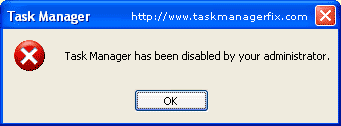
Task Manager Fix is a FREEWARE system utility to fix task manager disabled by spywares, trojans and displays error message : “Task Manager has been disabled by your administrator“, which blocks access to Windows Task Manager.
When you try to open Windows Task Manager, by pressing CTRL+ALT+DEL the following error often appear:
“Task Manager has been disabled by your administrator“
INSTANT solution to common problem – “Task Manager Not Working”


Task Manager has been disabled by your administrator

This error message appears due to restriction placed in the Windows Registry. One can easily enable Task Manager by editing some registry settings. For a normal user editing registry is not easy and a bit risky.
Task Manager Fix is designed to enable disabled Task Manager. Download the FREE Task Manager Fix tool to quickly enable Task Manager. Handy windows system recovery tool to remove task manager restrictions and effective solution to the problem – “Task Manager not Working”.

Monday, October 15, 2012

How To Split Large Files Into Smaller Files ?


HJSplit


HJSplit- Very nice looking freeware file splitter. It splits files of any type and size. Does not need to beinstalled. Just click on hjsplit.exe and the program starts. This program can even handle files which arelarger than 10Gb!

Download HJSplit

5 Most useful Google Search Technique

Google supports several Search hacks which gives you more control on search results. There are too many search operators to remember. Also, not all of them are useful all the time.
So I am describing today only the most frequently used search operators alongwith real-life examples.
*First note common syntax of following Google search operators…
Note:There should not be any space on either side of (colon) :
Also all search operator are case-sensitive!

1.  site: This operator is useful for searching a site and/or its subdomain.
site:http://computertipsandtrickstutorials.blogspot.in/ will restrict search to all subdomain under http://computertipsandtrickstutorials.blogspot.in/

site:edu will search all site in edu top domain. Useful for researchers and college students while studying and writing for papers as site:edu will restrict search results to the educational sites!

Example:
Abobe Photoshop site: http://computertipsandtrickstutorials.blogspot.in/

2.  filetype: You can directly use Google to search any type of files.
  • filetype:ppt to search all presentation slides.
  • filetype:pdf will search only pdf files! Good for searching ebooks.
  • filetype:pdf site:edu will return all files with pdf extensions from edu domain. Useful to complete journals or study assignments!
Example:
Electronics Handbook:pdf  

3. inurl: To search something in URLs
  • inurl:md5 will find keyword md5 in URLs.
  • inurl:md5 filetype:java will return all java source files with md5 in their name or URL. How about using this to complete programming assignments in college!
Also try allinurl: operator which looks all keywords into URL only!
Example:inurl:computertipsandtrickstutorials

4. intitle: To search something in page title. Useful when searching a too common word.
  • intitle:md5 will return all documents having md5 in their title.
  • intitle:Hacking filetype:pdf will return all pdf files i.e. mostly ebooks and papers about hacking.
Also try allintitle: operator which looks all keywords into title only!
Example:intitle:Google hacks

5. define: To use Google search as dictionary. There are other dedicated dictionary services but none of them is as clean and fast as Google.
  • define:hacker will show meanings of hacker.
  • define:network security will return meaning of network security.
  • Note: Do not type anything before define: or combine it with other operators!

Example:define:Virus

Bonus Google Hack

OR - To combine results of multiple searches! By default Google performs ANDing on keywords we use while searching. But sometimes explicit OR can help more.
  • filetype:pdf OR filetype:doc will search for pdf as well as doc files. This will help you complete your journals
  • site:en.wikipedia.org OR site:howstuffworks.com will restrict search to Wikipedia English and How Stuff Works site!
Note OR must be in capital and it doesn’t have colon after it!


How To Know Which Program To Use To Open An Unknown File Extension


program is correct to open a unknown extension
Method 1:Use a web service to find the appropriate program
1. Double click on the file and Select “Use the Web Service to find the appropriate program”.This method will call a web service by Microsoft which lets you find out which program is suitable to open the file with unknown extension.


You can also use this service in another way to check which program to use for a particular file extension
In the above link just change the extension txt with any unknown file extension in the above link to know which program to use to open a file with that unknown extension

Method 2: Use the web-site www.filext.com
1. Open the site www.filext.com in your browser.
2. Enter the extension of unknown file type, here in the image below by red arrow


3. Press Submit Query button, you will see a new page containing all the information about that file extension.
FilExt will display the complete description about that file extension and the program required to open that unknown file extension.